使用 Fernet 进行加密
密码学的黄金法则: 永远不要自己开发加密算法, 你可能永远都不知道你的算法有多少漏洞.
如果打 codeforces 写哈希被 hack 过应该会有所体会
Fernet
首先, Fernet 是一个使用简单且安全的加密规范, 主要用于对数据进行加解密和认证, 以确保数据在传输过程中的安全性. 当然, 一般主要是 Python 用户用的比较多, 因为是 Python 下大名鼎鼎的 cryptography 库所推荐的.
首先, Fernet 并不是一种单一的加密算法, 而是对多种可靠算法的组合和封装, 向用户提供一种简单易用的方法来进行数据加密.
主要由以下几部分组成:
- 加密算法: 使用
AES-128 的 CBC 模式提供对称加密.
AES 是 Advanced Encryption Standard 的缩写, 中文翻译为高级加密标准, 是美国联邦政府采用的区块加密标准
- 认证机制: 使用
HMAC-SHA256 对数据进行签名, 防止篡改.
SHA-256 是一种常见的哈希算法, 属于 SHA-2 系列.
HMAC 是一种基于哈希算法的认证机制, 在哈希的基础上引入密钥, 这个密钥发送方和接收方同时持有, 用于验证对方身份. 具体的实现有点类似于 "哈希加盐", 但是复杂很多, 需要生成 ipad 和 opad 密钥, 并根据密钥进行两次哈希.
- 防重放: 引入时间戳和随机数, 防止数据被二次发送.
听起来很复杂? 其实并没有很复杂, 因为像 AES 和 HMAC 之类的函数都是有现成已经封装好的, 可以直接调用. 在 cryptography 中其实就只用了 100 多行就实现了 Fernet.
那么下面我就用 TS 来举例实现一下.
import {
createCipheriv,
createDecipheriv,
createHmac,
randomBytes,
} from "crypto";
const FERNET_VERSION = 0x80;
export class Fernet {
private secret: string;
private signingKey: Buffer;
private encryptionKey: Buffer;
private defaultTTL: number;
constructor(secret?: string, defaultTTL: number = 0) {
this.secret = secret ?? Fernet.generateSecret();
const { signingKey, encryptionKey } = Fernet.deriveKeys(this.secret);
this.signingKey = signingKey;
this.encryptionKey = encryptionKey;
this.defaultTTL = defaultTTL;
}
static deriveKeys(secret: string): {
signingKey: Buffer;
encryptionKey: Buffer;
} {
let secretBuffer: Buffer;
try {
secretBuffer = Buffer.from(secret, "base64url");
if (secretBuffer.length !== 32) {
throw new Error();
}
} catch {
throw new Error("Secret must be 32 url-safe base64-encoded bytes");
}
const signingKey = secretBuffer.subarray(0, 16);
const encryptionKey = secretBuffer.subarray(16, 32);
return { signingKey, encryptionKey };
}
static generateSecret(): string {
let secret = randomBytes(32).toString("base64url");
const padding = "=".repeat((4 - (secret.length % 4)) % 4);
secret += padding;
return secret;
}
encrypt(data: string | Buffer): string {
const signingKey = this.signingKey;
const encryptionKey = this.encryptionKey;
const plaintext =
typeof data === "string" ? Buffer.from(data, "utf-8") : data;
const iv = randomBytes(16);
const timestamp = Buffer.alloc(8);
timestamp.writeBigUint64BE(BigInt(Math.floor(Date.now() / 1000)), 0);
const cipher = createCipheriv("aes-128-cbc", encryptionKey, iv);
const encrypted = Buffer.concat([cipher.update(plaintext), cipher.final()]);
const tokenWithoutHmac = Buffer.concat([
Buffer.from([FERNET_VERSION]),
timestamp,
iv,
encrypted,
]);
const hmac = createHmac("sha256", signingKey);
const signature = hmac.update(tokenWithoutHmac).digest();
const token = Buffer.concat([tokenWithoutHmac, signature]);
let tokenEncoded = token.toString("base64url");
const padding = "=".repeat((4 - (tokenEncoded.length % 4)) % 4);
tokenEncoded += padding;
return tokenEncoded;
}
decrypt(token: string, ttl?: number): Buffer {
const signingKey = this.signingKey;
const encryptionKey = this.encryptionKey;
const decryptedToken = Buffer.from(token, "base64url");
if (decryptedToken.length < 57) {
throw new Error("Token too short");
}
const version = decryptedToken[0];
if (version !== FERNET_VERSION) {
throw new Error("Invalid token version");
}
const timestamp = decryptedToken.subarray(1, 9);
const iv = decryptedToken.subarray(9, 25);
const cipherText = decryptedToken.subarray(25, -32);
const providedHmac = decryptedToken.subarray(-32);
const tokenWithoutHmac = decryptedToken.subarray(0, -32);
const hmac = createHmac("sha256", signingKey);
hmac.update(tokenWithoutHmac);
const calculatedHmac = hmac.digest();
if (!calculatedHmac.equals(providedHmac)) {
throw new Error("HMAC verification failed");
}
ttl = ttl ?? this.defaultTTL;
if (ttl > 0) {
const tokenTimestamp = timestamp.readBigUint64BE(0);
const currentTimestamp = BigInt(Math.floor(Date.now() / 1000));
const age = Number(currentTimestamp - tokenTimestamp);
if (age > ttl) {
throw new Error("Token has expired");
}
}
const decipher = createDecipheriv("aes-128-cbc", encryptionKey, iv);
const decrypted = Buffer.concat([
decipher.update(cipherText),
decipher.final(),
]);
return decrypted;
}
encryptJSON(data: any): string {
try {
const jsonString = JSON.stringify(data);
return this.encrypt(jsonString);
} catch {
throw new Error("Input data cannot be stringify");
}
}
decryptJSON<T = any>(token: string, ttl?: number): T {
const decrypted = this.decrypt(token, ttl);
const jsonString = decrypted.toString("utf-8");
return JSON.parse(jsonString) as T;
}
static getTokenAge(token: string): number {
const decryptedToken = Buffer.from(token, "base64url");
if (decryptedToken.length < 57) {
throw new Error("Token too short");
}
const timestamp = decryptedToken.subarray(1, 9);
const tokenTimestamp = timestamp.readBigInt64BE(0);
const currentTimestamp = BigInt(Math.floor(Date.now() / 1000));
return Number(currentTimestamp - tokenTimestamp);
}
isTokenExpired(token: string, ttl?: number): boolean {
const age = Fernet.getTokenAge(token);
return age > (ttl ?? this.defaultTTL);
}
getSecret(): string {
return this.secret;
}
}
export default Fernet;
看不懂? 没关系, 因为还没有说明 Fernet 的结构呢, 首先 Fernet 加密后的 token 使用 base64 解码后的数据可以分为一下几段:
- Version: Fernet 的版本号, 目前固定是
0x80, 占一个字节
- Timestamp: 时间戳, 长度固定为八个字节, 大端序 (会来看这篇文章的应该都知道大端序是什么吧)
- IV:
AES-CBC 的加密初始化向量, 16 字节
- Ciphertext: 加密后的密文, 长度不定
- HMAC: 使用
HMAC-SHA256 对前面数据签名后的值, 32 字节
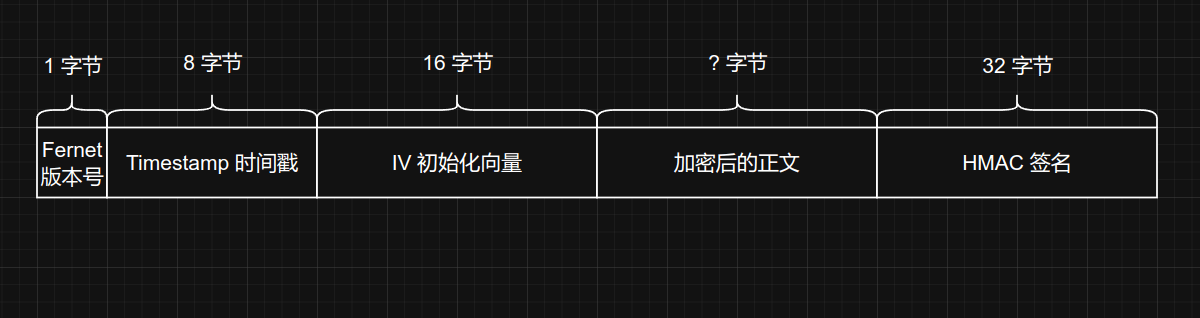
对于每个部分各大编程语言都提供了相成的库, 直接调用就好了, 然后在把各部分的二进制结果拼在一起转成 base64 就好了, 我就不过多赘述了.
因为 Fernet 同时需要加密和签名两种功能, 所以 Fernet 同时也需要两种密钥才可以正常工作. 一个 Fernet 密钥的长度的 32 字节, 也就是 256 位, 把他从中间分开, 前面的 128 位就是签名密钥, 后面的 128 位就是加密密钥了.
然后, 不知道你发现没有, 上面的代码里还有这样的一句 //! important!, 这就是比较逆天的一点了.
因为 Python 和 Node 对于 base64url 的实现标准是不同的, 按照 rfc4648 的标准, 在原来的 base64 中末尾的等号是可选的, 在 Python 这边, 他的 base64url 的实现是直接替换 _ 和 - 到 base64 的标准之后, 再丢给标准的 base64 解码器解码, 所以在 Python 中 urlsafe_b64decode() 这个函数接受的字符串必须使用 = 对齐. 而 Node 这边直接省略掉了(可能是为了节省网络带宽?). 这样就导致了在 Python 中解 Node 生成的 base64url token 会当场爆炸, 所以我在上面的代码中手动加入了等号来对齐.
其他
Fernet 的加密是应用层的加密, 在代码中使用纯软件的方式实现, 一般都是运行在 CPU 上. 还有一种是传输层的加密(TLS), 运行在网络协议层, 通常有硬件加速的支持, 在性能上通常会比软件高出一大截(TLS 握手除外, 非对称加密性能损耗还是太高了).
当然, 应用层也是可以自己调用硬件加速的, 只不过支持较少.
关于 TLS 的话除开正常的单向验证之外还有一种双向验证的, 称为 mTLS, 这种 TLS 连接的双方都持有证书, 需要相互验证, 很适合端到端加密的场景. 想要进一步了解的话可以去看看 CF 的这一篇文章: 什么是 mTLS?| 双向 TLS | Cloudflare, 我就不复读了.
mTLS 好是好, 但是呢有个问题, 你的应用程序并不会自带 TLS (当然, 一般来说. 应该也没人会直接部署 Web app 到 443 端口吧), 所以还需要一个外置的 "TLS 解析器", 比如说 Istio 这类服务网格(Service Mesh), 或是 Nginx 这类 HTTP 服务器. 而且 mTLS 的证书都是自签的, 还要自己一个一个想清楚那个服务用那个证书, 哪里用自签哪里用公认证书...
部署难度: 超级加倍.
参考
Fernet (symmetric encryption) — Cryptography 46.0.0.dev1 documentation: cryptography.io/en/latest/fernet/
Fernet - asecuritysite.com: asecuritysite.com/encryption/fernet
Openstack 工作原理——Fernet Token 详解 - 墨天轮: www.modb.pro/db/160014
Advanced Encryption Standard - Wikipedia: en.wikipedia.org/wiki/Advanced_Encryption_Standard
什么是 mTLS?| 双向 TLS | Cloudflare: www.cloudflare.com/zh-cn/…/what-is-mutual-tls/
Base64 - Wikipedia: en.wikipedia.org/wiki/Base64#URL_applications
RFC 4648 - The Base16, Base32, and Base64 Data Encodings: datatracker.ietf.org/doc/html/rfc4648#section-5